Article
Build a Fully Local Voice AI on Windows — No API, No Subscription
A real-time voice companion running entirely on one RTX 5080. Four stages, five models, ~15.5 GB VRAM, 0.70s from your last word to her first sound. Every number here was measured on the machine, not copied from a spec sheet.
A voice you can talk to in real time, running entirely on one consumer graphics card. No account, no API key, no metered billing, and nothing leaving the machine. Pull the network cable and the conversation continues.
This is the complete build. Every number below was measured on the machine described here — none of it is copied from a spec sheet or another tutorial.
The code is on GitHub: github.com/xtymac/ai-companion — launch scripts, the measurement tool, the persona files, and the raw measurement logs behind every figure on this page.
What you end up with
| Measured | |
|---|---|
| End-to-end latency (my last word → her first sound) | 0.70 s median, 0.60 s best |
| LLM response | 0.19 s median |
| LLM generation | 125.9 tok/s |
| TTS first packet (warm) | 0.24 s |
| TTS first packet (cold) | 3.49 s |
| Full cold start | 37–40 s |
| Total VRAM | ~15.5 GB |
One thing to set expectations: this is voice only. No avatar, no lip sync, no face. That is exactly why it is this fast.
Hardware
| Minimum | What I used | |
|---|---|---|
| GPU | 8 GB NVIDIA (see note) | RTX 5080, 16 GB |
| RAM | 16 GB | 64 GB |
| Disk | 60 GB free | — |
| OS | Windows 10/11 | Windows 11, native, no WSL |
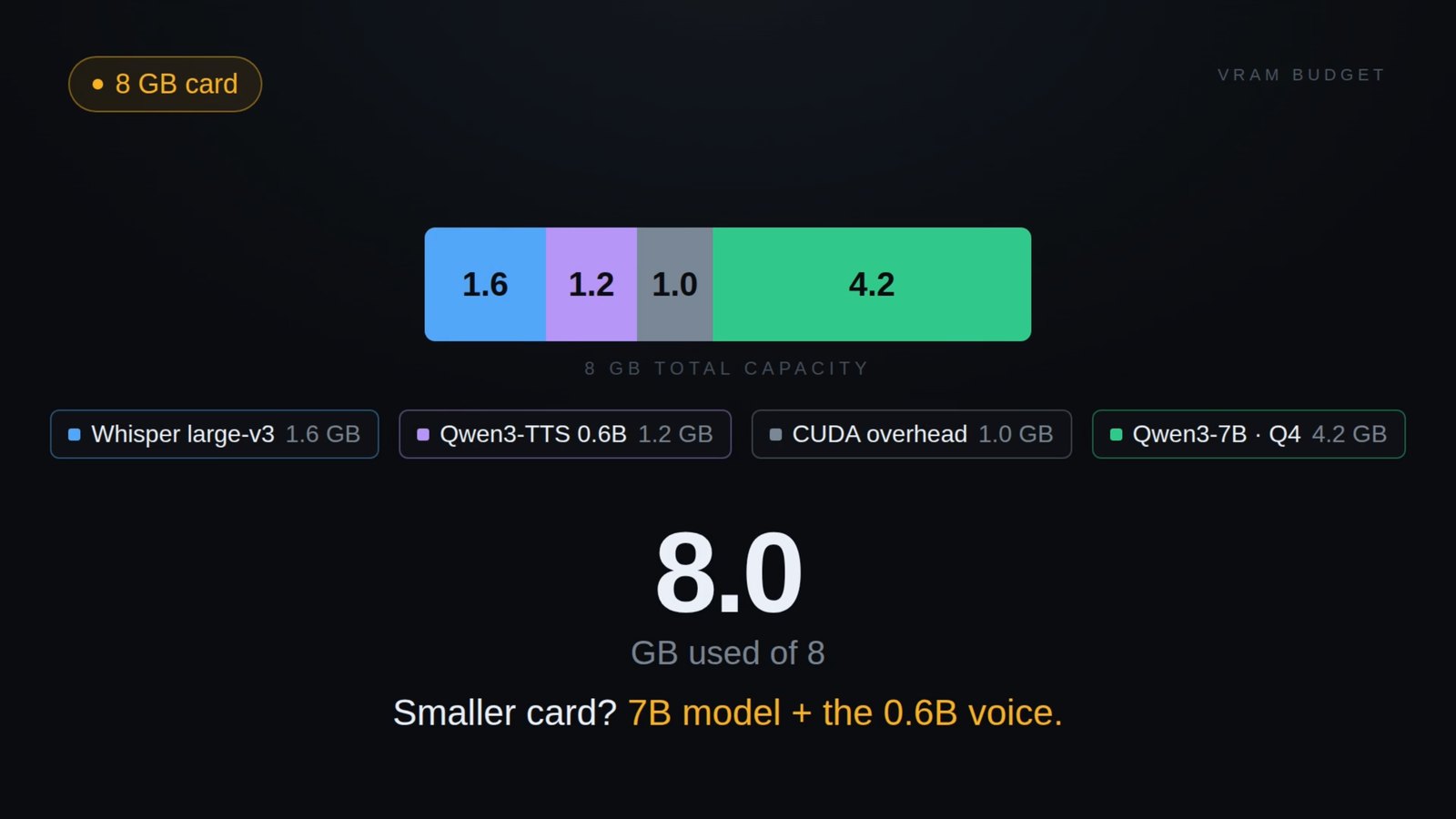
On the 8 GB claim. Most tutorials say 8 GB is enough. Do the arithmetic before you trust that: Whisper (~1.6 GB) + Qwen3-TTS (~3.5 GB) + CUDA context (~1 GB) is already ~6 GB before the language model loads. On 8 GB you are looking at a 4B model with a downgraded speech-to-text model, and it will be tight. I did not test it, so I am not going to tell you it works.
AMD and integrated graphics will not work. The stack is CUDA-only.
Blackwell owners (RTX 50-series), read this first. Your card is sm_120. Plenty of PyTorch builds have no sm_120 kernels, and you will only find out after downloading ~12 GB of model weights. Verify before you download anything — there is a check below.
The stack
Four stages, five models:
you speak
   │
   ▼
① TURN-TAKING   Silero VAD v5 (CPU)  +  Smart Turn v3.2 (ONNX, CPU)
   │             "is this voice?"  →  "is the sentence finished?"
   ▼
② SPEECH → TEXT  Whisper large-v3-turbo (fp16, CUDA)
   │
   ▼
③ THINKING       Qwen3-8B-Q5_K_M via llama.cpp, proxied by llama-swap
   │
   ▼
④ TEXT → SPEECH  Qwen3-TTS-12Hz-1.7B-Base (fp16, CUDA) — cloned voice
   │
   ▼
you hear (16 kHz, int16, mono)| Stage | Model | VRAM |
|---|---|---|
| VAD | Silero VAD v5 | ~0 (CPU) |
| Turn detection | Smart Turn v3.2 | 0 (CPU) |
| STT | Whisper large-v3-turbo, fp16 | ~1.6 GB |
| LLM | Qwen3-8B-Q5_K_M, -ngl 99 -c 4096 -fa on | ~6.5 GB |
| TTS | Qwen3-TTS-12Hz-1.7B-Base, fp16 | ~3.5 GB |
| Measured total | ~15.5 GB |
Supporting pieces: huggingface/speech-to-speech v0.2.12 as the framework, llama.cpp b10331-bin-win-cuda-13.3-x64, llama-swap v248, PyTorch 2.9.1+cu128, faster-qwen3-tts 0.3.2, sounddevice 0.5.5.
Why 8B and not 14B
Every 16 GB guide recommends a 14-billion-parameter model. I went with 8B on purpose:
| 14B Q4 | 8B Q5 | |
|---|---|---|
| Model weights | 8.5 GB | 5.7 GB |
| • Whisper, TTS, CUDA | ~6.1 GB | ~6.1 GB |
| Total | 14.6 GB | 11.8 GB |
14B does not actually fit. The card is 16.3 GB, and Windows is holding 2.3–2.6 GB before a single model loads — 14.6 plus the desktop puts you over. Guides that recommend 14B for a 16 GB card are quoting the sticker capacity, not what is left after the compositor takes its share.
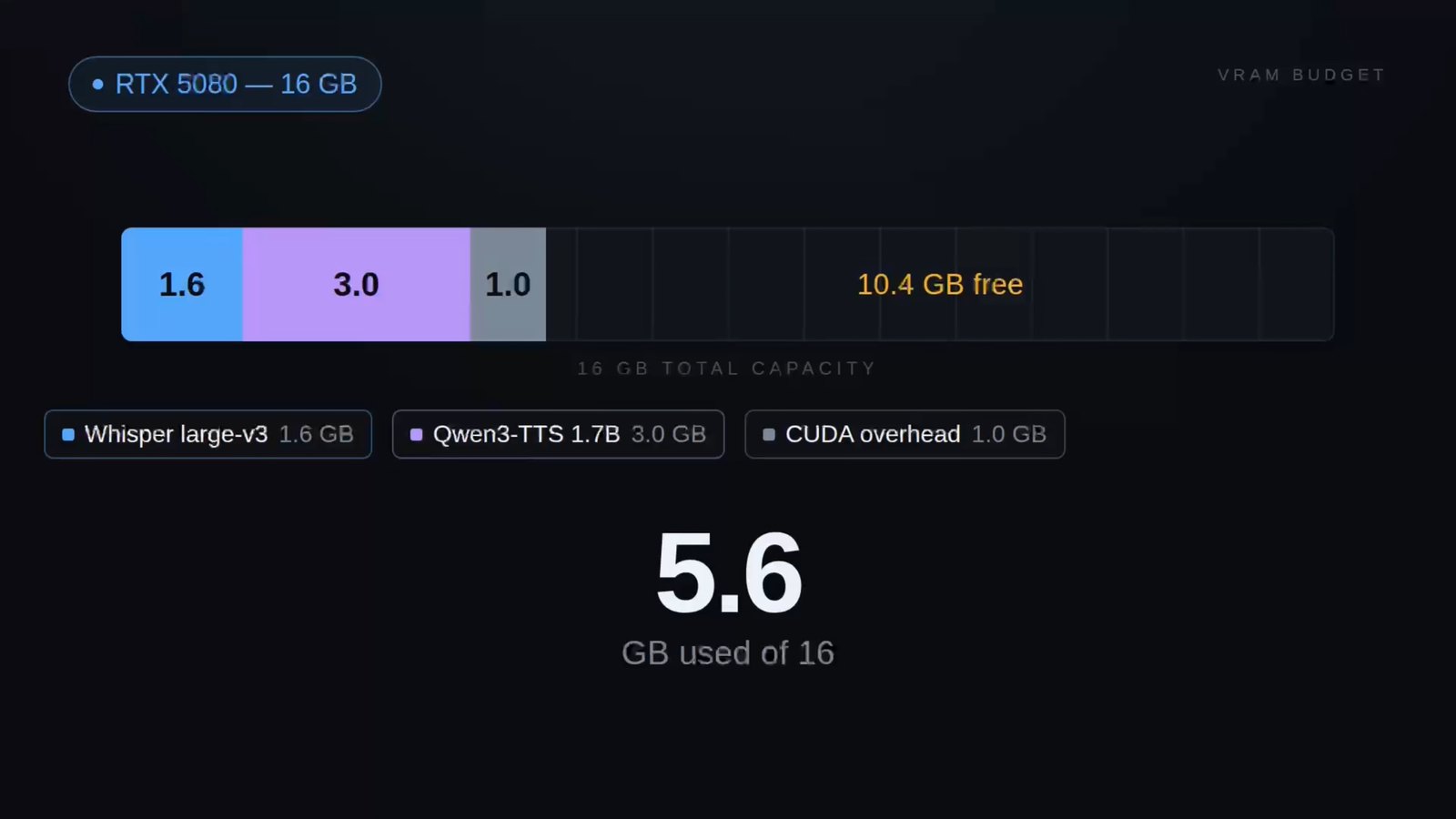
8B leaves roughly 3 GB of real headroom, which is what you need to screen-record and to add anything later. And since replies are capped at two sentences, the quality difference is very hard to hear at that length.
You spend this build thinking you are competing with the model for VRAM. You are competing with your own environment.
Before you install
Python must be 3.10 or 3.11. Not 3.12 or newer; the dependencies are not ported.
python --version
nvidia-smi        # driver should report CUDA 12.x or newer
git --version
ffmpeg -version
The path rule. Create your working directory with no spaces, no non-ASCII characters, and no +:
mkdir D:\ai\s2s
cd D:\ai\s2s
This single rule causes more failed installs than anything technical. Do not put this project in a Dropbox folder with a Chinese name.
Free your VRAM before you start. More on this below, but the short version: your desktop is probably eating 4–5 GB before a single model loads.
Install
1. Virtual environment
Use the absolute path to your real Python, not whatever is first on PATH — Windows ships a Microsoft Store stub that will bite you.
& "$env:LOCALAPPDATA\Programs\Python\Python311\python.exe" -m venv D:\ai\s2s\.venv
D:\ai\s2s\.venv\Scripts\Activate.ps1
python -m pip install --upgrade pip
Keep the venv on the same drive as the models. PyTorch and CUDA wheels alone are several gigabytes.
2. PyTorch first, on its own
Install PyTorch before the project’s own dependencies, so the project cannot pin you to an older CUDA build:
pip install torch==2.9.1 torchaudio==2.9.1 --index-url https://download.pytorch.org/whl/cu128Skip torchvision — nothing in this pipeline touches it, and it costs about a gigabyte. Pin the versions: an unpinned install can drift onto a build without sm_120 kernels, which is exactly the failure the next step exists to catch.
3. Verify the GPU before downloading anything
import torch
print(torch.__version__, torch.version.cuda)
print(torch.cuda.get_arch_list())     # must contain sm_120 on RTX 50-series
print(torch.cuda.is_available())
x = torch.randn(1000, 1000, device="cuda") @ torch.randn(1000, 1000, device="cuda")
print(x.sum().item())                 # must not raise
If sm_120 is missing, or you get no kernel image is available for execution on the device, stop here and install a build for CUDA 12.8 or newer. Do not continue — you would be downloading 12 GB of weights you cannot use.
4. The framework
git clone https://github.com/huggingface/speech-to-speech
cd speech-to-speech
pip install -e .
The project uses pyproject.toml with optional extras. There is no requirements.txt. Check the current extras rather than copying a command from anywhere — including this page.
Re-run the sm_120 check after this step. Dependency resolution can quietly replace your PyTorch build.
5. llama.cpp and llama-swap
Neither of these is a Python package, and most tutorials forget to mention them.
- llama.cpp — download the prebuilt Windows CUDA release. On a 50-series card, make sure the build supports Blackwell; an older CUDA 12.4 build will fail the same way PyTorch does.
- llama-swap — download the Windows binary. It proxies the model server and lets you swap models without restarting the pipeline.
Test
llama-server.exewith any small GGUF before you download the real one. Cheap failures first.
6. Models
# TTS — note: Base, not CustomVoice
modelscope download --model Qwen/Qwen3-TTS-12Hz-1.7B-Base --local_dir .\models\qwen3-tts
For the language model, get Qwen3-8B-Q5_K_M.gguf and put it in models\. Whisper downloads itself on first run.
Base, not CustomVoice. Qwen3-TTS ships three variants. -Base clones a voice from a reference sample; -CustomVoice uses preset voices and is the upstream default. If you use CustomVoice with a reference clip, the voice drifts between replies and you will spend a long time wondering why.
7. Reference audio
This determines what she sounds like.
- 5–10 seconds, never more than 15
- Clean voice, no music, no reverb, no keyboard
- Mono, 24 kHz, WAV
- The delivery gets cloned along with the timbre. A flat read produces a flat voice.
ffmpeg -i raw.mp3 -ac 1 -ar 24000 -c:a pcm_s16le voices\ref.wav
ffprobe -v error -show_entries stream=sample_rate,channels,codec_name -show_entries format=duration voices\ref.wav
Mine is 7.81 s, mono, 24 kHz, peak −1.2 dBFS, mean −15.0 dBFS. No clipping, no normalisation needed.
On consent. Cloning a voice from a few seconds of audio is trivially easy and easy to misuse. Do not clone anyone’s voice without their explicit permission. Use your own, a public-domain dataset, or — as I did — a synthetic voice that does not belong to a real person.
You also need the transcript. Whatever the reference clip says, word for word, goes into --qwen3_tts_ref_text. The upstream default is an unrelated English paragraph, and leaving it there does not raise an error — it just silently degrades the cloning. This is the single most invisible mistake in the whole build.
Running it
Smoke test first
Before touching Qwen3-TTS, prove that your microphone, VAD and Whisper all work using a lightweight backend:
python -m speech_to_speech.s2s_pipeline local --tts facebookMMS --language en(Older guides say --tts melo. That backend has been removed.)
If you can speak and get a reply, three of the four layers are healthy. Do not skip this — debugging the whole chain at once is miserable.
Start the model server
llama-swap.yaml:
models:
  qwen3-8b-q5:
    cmd: ./llama-server -m models/Qwen3-8B-Q5_K_M.gguf --port 8081 -ngl 99 -c 4096 -fa on --host 0.0.0.0
    proxy: "http://127.0.0.1:8081"
    ttl: 0
ttl: 0 keeps the model resident. Without it a cold reload will pollute your latency measurements.
Start it, then verify before going further:
curl.exe http://127.0.0.1:8090/v1/chat/completions -H "Content-Type: application/json" -d "{\"model\":\"qwen3-8b-q5\",\"messages\":[{\"role\":\"user\",\"content\":\"hello\"}]}"In PowerShell, curl is an alias for Invoke-WebRequest — use curl.exe. First load takes 10–30 seconds. If this does not return JSON, do not continue.
Start the pipeline
python -m speech_to_speech.s2s_pipeline local `
  --stt whisper --stt_model_name openai/whisper-large-v3-turbo --language en `
  --llm_backend chat-completions `
  --responses_api_base_url http://127.0.0.1:8090/v1 `
  --responses_api_api_key local `
  --model_name qwen3-8b-q5 `
  --responses_api_disable_thinking `
  --tts qwen3 `
  --qwen3_tts_model_name D:/ai/s2s/models/qwen3-tts `
  --qwen3_tts_ref_audio D:/ai/s2s/voices/ref.wav `
  --qwen3_tts_ref_text "<exactly what the reference clip says>" `
  --qwen3_tts_backend torch --qwen3_tts_language en `
  --no_enable_live_transcription `
  --thresh 0.4 --min_speech_ms 500 --min_silence_ms 1200 `
  --init_chat_prompt "<persona, see below>"
Write this into a .ps1 file rather than passing an argument array through Start-Process — PowerShell re-splits array elements on spaces and will quietly truncate your reference text at the first space.
About --responses_api_api_key local: the key field is never validated. The protocol is OpenAI-compatible because that has become the default shape, and the address is 127.0.0.1. There is no billing and no outbound traffic.
The persona, and why it matters more than you expect
The upstream default is a generic assistant with a twenty-word cap. You will want your own, and there are three rules that are functional rather than stylistic:
You are <name>. You're talking with him like a close friend —
not an AI, not an assistant, not a program.

Rules:
- Two sentences max, under 25 words total.
- Everyday spoken English. No markdown, no lists, no numbering.
- No emoji, no emoticons, no parenthetical stage directions.
- Don't repeat my question back. Just answer.
- Spell out numbers as words ("three o'clock", not "3 o'clock").
/no_think- The length cap is the single most important line. Without it the model writes paragraphs and the TTS reads for thirty seconds. This is the number one reason the experience collapses.
- Banning markdown and emoji is not cosmetic. The TTS reads formatting aloud — asterisks, bullet characters, and long emoji descriptions.
/no_thinkturns off Qwen3’s reasoning mode. Combined with--responses_api_disable_thinkingit belts and braces the problem described below. Giving two or three example exchanges works far better than a list of adjectives. Without examples the model drifts back into “how may I assist you today.”
Five traps that cost me hours
1. --min_silence_ms is silently ignored by default
Live transcription is on by default, and when it is, turn-taking is decided by live_transcription_min_silence_ms instead. Your --min_silence_ms is discarded without a warning.
The symptom is bizarre: she starts replying about 700 ms after you begin speaking, while the VAD segment does not close until seconds later. Pass --no_enable_live_transcription and the tuning advice in every other guide starts to apply.
2. NVIDIA Broadcast mutes your microphone into a hallucination loop
When Broadcast takes exclusive control of the input device, the level drops from about −29 dBFS to −66 dBFS with a noise floor of exactly 0.0000. Whisper receives digital silence and hallucinates sentences. She then answers the hallucination. It looks exactly like the AI talking to itself.
It also occupies port 8080, and closing the window does not exit the process — you have to kill it.
3. Audio device indices drift
Connect or disconnect a Bluetooth device and every index renumbers. Resolve devices by name, not index, or your audio will be silently routed into a virtual device.
4. Your desktop is eating ~5 GB of VRAM
On a 16 GB card I had 11 GB free with no models loaded. Two things worth knowing:
- Killing background applications barely helps. A second pass across everything closeable returned 107 MiB.
- Display settings returned 3,379 MiB — dropping to a single monitor, lower resolution and 60 Hz. That is more than thirty times the gain, and unlike closed apps it does not come back. The compositor scales with resolution, refresh rate, HDR and monitor count. That is the lever. Advertised VRAM and usable VRAM are not the same number.
Also: turn off CUDA sysmem fallback in the NVIDIA control panel. With it on, running out of VRAM does not raise an error — it silently spills to system memory and everything becomes five to ten times slower. If you are measuring latency, that quietly invalidates every number you collect.
5. characters.json is not read by the main program
If you are following a guide that has you write a persona file, check that something actually loads it. In the current upstream, the persona must be injected at launch with --init_chat_prompt.
Separately, Qwen3 defaults to thinking mode, which puts the entire answer in reasoning_content and leaves content empty. The TTS then receives an empty string and says nothing — a failure that looks identical to “TTS is broken.”
Two Windows-specific limits
No quantized TTS. The GGML backend for Qwen3-TTS depends on qwentts-cpp-python, which only publishes manylinux wheels. Upstream’s pyproject.toml excludes the [ggml] extra on Windows for exactly this reason. On native Windows you get torch and fp16, using ~3.5 GB. The --qwen3_tts_ggml_quantization flag exists but does nothing here.
Guides age fast. The tutorial I started from was two weeks old. In that time upstream had repackaged the project into src/, replaced requirements.txt with pyproject.toml, removed the melo backend, renamed the LLM flags, and added native Qwen3-TTS support that made three “required” patch files unnecessary. Read --help and the source before trusting any command — including the ones on this page.
Where the latency actually goes
| Measured | |
|---|---|
| End-to-end, median | 0.70 s |
| End-to-end, best | 0.60 s |
| LLM response | 0.19 s |
| TTS first packet, warm | 0.24 s |
| TTS first packet, cold | 3.49 s |
| TTS realtime factor | 3.0–3.35 |
The first exchange after startup is always slow — that is warm-up, and it is normal.
One number is worth dwelling on: min_silence_ms. Set it too low and she interrupts you constantly; set it too high and she feels slow. The cost is linear — every millisecond you add to the silence window is a millisecond added to her response. I settled at 1200 ms because it stopped her interrupting me; I have not yet walked it back down to find the smallest value that still works, so treat 1200 as a setting that works rather than an optimum. That delay is not a performance limitation. It is the price of her waiting until you have actually finished.
Credits
The original Chinese tutorial that pointed me at this stack is by 零度解说 (freedidi.com). The upstream projects are huggingface/speech-to-speech, QwenLM/Qwen3-TTS, mostlygeek/llama-swap, ggerganov/llama.cpp, and pipecat-ai/smart-turn-v3. All models used here are open weights under permissive licences.
Built and measured on 2026-08-10. If a command here no longer works, upstream has moved again — check the source.
Everything described here — scripts, configs, measurement data — is in the repository: github.com/xtymac/ai-companion
Related writing
OpenAI DevDay 2026: ChatGPT Doesn't Wait for You Anymore
OpenAI's DevDay 2026 shipped always-on agents called dots, a shared workspace for them, GPT-6.1 Sol at a fifth of Astra's price, a 300-token-per-second speed tier, and its own answer to Jev. Here's what actually launched, what it costs, and where I'd start.
- AI News
- AI Models
- Agents
- AI Engineering
Higgsfield Layers: split any flat image into editable layers
Higgsfield just shipped Layers — an AI image editor that splits one flat image into real, editable layers. Swap the background, the object, even the text, and nothing else moves. Here's what it actually does, what it costs, and where it breaks.