記事
/analyzeスキル:バズった動画を徹底的に分解する
バズった短尺動画を分析するClaudeカスタムスキルについて、Cindy Zhuの設定手順を紹介。スキルをインストールし、Apifyを接続して実際の文字起こしと指標をClaudeに取得させ、1週間分の保存リールからフック、構成、視聴維持、動画間の共通パターンを分析します。そのまま使えるスキルのソース全文も収録。
こんにちは、Macです 🌱 PATTERNとコメントしてくれたので、私がClaudeでコンテンツを調査するときの環境をすべて紹介します。/analyzeというカスタムスキルで、バズった動画のフック、形式、ストーリー構成、成功した理由を分解し、さらに複数の動画に共通するパターンを見つけます。自分のジャンルで今、何が評価されているかが具体的にわかります。リンクを貼れば、Claudeが実際の文字起こしを自分で取得します。
この環境の元になったのはCindy Zhuのオリジナルガイドです。スキルを作ったのは彼女で、ぜひ彼女の発信も追ってみてください。私がここに追加したのは、ローカルファイルを使う方法とNotionへの同期で、どちらも自分で試しています。
まずはここから — 📥 スキルファイルを入手
analyze-skill.zipをダウンロードしてください。このファイルをそのままClaudeにドラッグすればよく、編集は不要です。
🧩 ステップ1:スキルをインストールする
- 上のファイルをダウンロードします。
- まずスキルの場所を確認します。ClaudeでCustomize、次にSkillsへ進みます。ここで追加と有効化を行います。
- 続いてCustomize、Skillsを開きます。
- +ボタンを押し、+ Create skill、Upload a skillを選び、
analyze-skill.zipをドラッグします。 - 完了です。スキル一覧に表示され、使えるようになります。スキルは無料プランでも使えるので、この作業にProは不要です。
⚡ ステップ2:Apifyを接続する(ここが重要)
正直に言うと、問題があります。ClaudeはInstagramやTikTokのリンクを開けません。「ときどき開けない」のではなく、開けないのです。Instagramのrobots.txtはAnthropicのクローラーを名指しでブロックしているため、リールのURLが本物でも架空でも、同じログイン画面が返ります。Claudeは動画を見たり、音声を聞いたりすることもできません。
選択肢は2つです。毎回手作業で文字起こしをコピーするか、一度だけツールを接続して以後は気にせず使うか。ツールを接続しましょう。Apifyはスクレイピングのプラットフォームで、Claudeにコネクターとして接続できます。貼り付けたリンクから、Claude自身がリールのデータ、つまり指標と発話の文字起こしを取得できるようになります。
設定は一度だけ、約2分です。
- 🧲 apify.comで無料アカウントを作ります。カードは不要で、毎月5ドル分のクレジットが付きます。
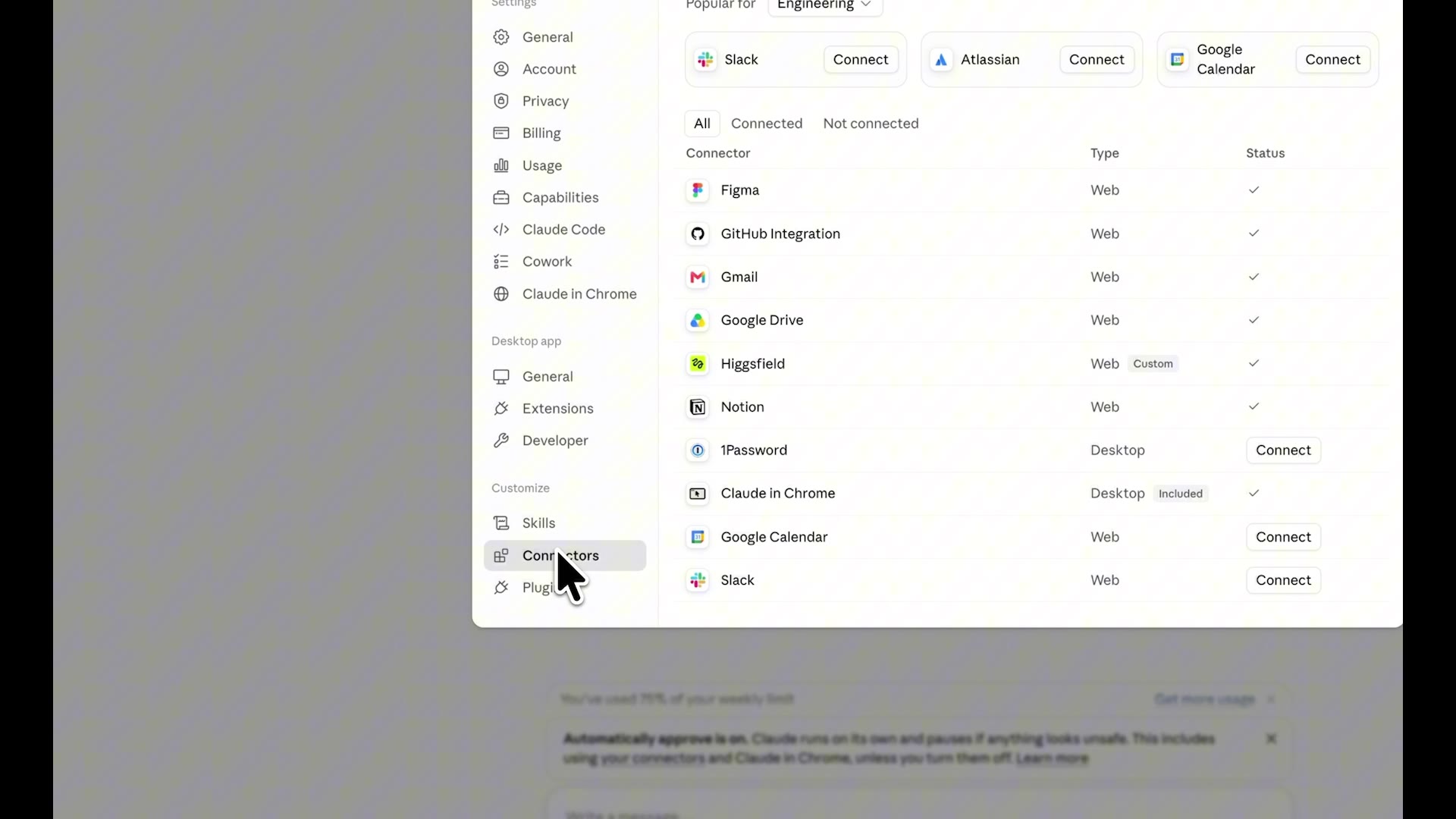
- 🔌 ClaudeのSettings(バージョンによってはCustomize)からConnectorsへ進みます。ディレクトリでApifyを検索して追加します。見つからなければ**+**を押し、Add custom connectorを選んで、
https://mcp.apify.comを貼り付けます。 - 🔑 Addを押して、開いたポップアップでApifyにログインします。OAuthなので、APIキーをコピーして貼り付ける必要はありません。
- ✅ 接続確認として、Claudeに「使えるApifyのツールを教えて」と聞きます。
search-actorsやcall-actorなどが表示されれば成功です。
無料プランの方にも朗報です。カスタムコネクターは無料プランでも1つ使えます。その1つをこれにしましょう。
📋 ステップ3:リンクを貼る
これで作業の流れは完成です。1週間リールを保存しておき、まとめて貼り付けます。
📋 1週間分の保存リンクをまとめて分析する
/analyze

https://www.instagram.com/reel/XXXXXXXXX/
https://www.instagram.com/reel/YYYYYYYYY/
https://www.instagram.com/reel/ZZZZZZZZZ/

Pull these with Apify (include transcripts), then run the full
teardown on each and give me the pattern report. My niche is
[what you make content about, and for whom].
ClaudeはInstagram Reel Scraperを実行します。このツールはリールの直接URLを受け取り、文字起こし、キャプション、再生数、いいね数、コメント数、長さ、投稿日を一度に返します。別の文字起こしツールも、コピー&ペーストも不要です。
個別リンクではなく、アカウント全体を指定することもできます。
🕵️ 競合アカウント全体を調べる場合
/analyze

Pull @competitor's last 15 reels with Apify (include transcripts,
only posts newer than 3 months), work out their median views so we
can score outliers properly, then give me the pattern report.
実用上の注意が2つあります。一度に頼むのは5〜10本にしてください。大量に処理すると結果が途中で切れ、Claudeが残りを取りに戻る必要があるためです。また、長い処理ではすぐに回答する代わりにジョブIDが返り、Claudeが進捗を確認することがあります。正常な動作なので、完了を待ってください。
実際の費用 — 💸 いくらかかるのか
ここは曖昧にされがちなので、率直に説明します。Apifyで課金されるのは2つです。
- 📊 スクレイピング自体: リール1,000本あたり約2.60ドル。ほとんどかかりません。
- 🎙️ 文字起こし: リール1本あたり約5セント(開始した1分ごとに課金されるため、30秒でも1分扱い)。費用のほぼすべてがこちらです。 つまり、毎月の無料クレジット5ドルで、月に約100本、週に約25本を文字起こしできます。多くの人にとって、競合調査としては十分すぎる量でしょう。クレジットは繰り越されず、使い切ると次のサイクルまで処理が止まるため、予想外の請求は発生しません。
コネクターなしなら? — 🙅 手作業で補う方法
Apifyがなくてもスキルは動きますが、素材は自分で用意する必要があります。リールごとに、ログイン不要の無料文字起こしツールへURLを貼ってテキストをコピーし、キャプション、再生数、そのアカウントの普段のおおよその再生数を控えます。最後の数字が、突出度スコアに意味を持たせます。
使えるツールはSupadata(無料、ログイン不要)、TokScript(1日5回無料。アドレスバーでリールのURLの前にtokscript.com/を付けても使えます)、Transcript365(週5クレジット無料)です。
⚠️ どちらの方法でも、安全面で1つだけ。「リールダウンローダー」サイトには近づかないでください。この種のサイトには、偽のダウンロードボタンや、ログイン情報を狙う模倣ページがあふれています。
ファイルがあるなら — 🎞️ ローカル動画でも使える
もう1つ知っておきたいことがあります。Apifyやリンクだけでなく、先に動画をダウンロードできれば、このスキルはローカルの動画ファイルでも使えます。
これでリンク経由では届かないケースに対応できます。非公開アカウント、削除済みの投稿、URLではなく送られてきた画面録画。そして特に便利なのが、自分の未公開の下書きで、投稿前にフックやテンポを確認したい場合です。
多くの人が想像する仕組みとは違うので、正確に説明します。Claudeは依然として音声を聞けません。 ファイルからフレームを取り出し、映像に焼き込まれた字幕を読むのです。したがって、絶対条件が1つあります。動画に画面上の字幕が必要です。 多くのリールにはあります。なければ復元できる文字起こしはなく、音声モデルをダウンロードして補うこともできません。
🎞️ 手元の動画ファイルを分析する
/analyze

[attach the .mp4 or .mov]

This is a screen recording of a reel with burned-in subtitles.
Sample the frames and read the subtitles off the screen — do not
guess at the audio. Then run the full teardown, and go deep on the
visual layer: first frame, on-screen text, cut frequency, props.
Views and likes aren't in the recording, so mark the outlier score
not computable. My niche is [what you make content about, and for whom].
ファイルはメッセージに添付してください。パスだけでは使えません。Claudeが読むのはアップロードされた内容であり、あなたのハードディスクではありません。
手放すのは、あらゆる数値です。 動画ファイルには再生数、いいね数、キャプション、アカウントの基準値がありません。つまり突出度スコアも出せません。これは、その動画が本当にそのアカウントの通常水準を上回ったのか、それともフォロワーの多さに支えられただけなのかを示す数字です。得られるのは、画面にたまたま映っている情報(リポスト数や一部だけ見えるキャプションなど)だけです。
代わりに得られるのは、コネクターからは決して得られないもの、映像です。 この方法なら、視覚的フックとビジュアルレイアウトの項目が「取得不可」のままではなくなります。最初のフレームの構図、画面上の文字の扱い、小道具、実際に数えたカットの頻度がわかります。38秒のリールなら、通常は十数種類の視覚的な状態があります。クリエイターが2〜3秒ごとに構図を切り替えていると知ることは、文字起こしより実践に役立つ場合も多いのです。
この2つの方法は競合しません。コネクターは映像なしで数字をくれ、ファイルは数字なしで映像をくれます。特に気になる動画なら、両方を使いましょう。リンクから指標を取得し、ファイルを渡して視覚的な側面を分析します。
🌐 もう1つの方法:Claude in Chrome
Claude in Chromeは、ブロックされるクローラーではなく、自分のブラウザーセッション内で動くため、実際に開いているリールのページを見ることができます。コネクターとは仕組みが違い、特定の投稿をClaudeと一緒に見たいときに便利です。ただし条件があります。有料プラン(Pro、Max、Team、Enterprise)限定で、デスクトップ版Chromeのみ。Arc、Brave、モバイルには対応しません。まとめて調査するなら、Apifyコネクターの方が向いています。
出力 — 🔎 何が返ってくるのか
動画ごとに、突出度スコアを含む概要表、文字起こし、3層のフック分析(発話・映像・テキスト)、展開ごとのストーリー構成、視聴維持の仕組み、ビジュアルレイアウト、キャプションとCTAの仕組み、成功した理由(順位付き)、自分の版に使える穴埋め式のリミックステンプレートが返ります。2本以上ならパターンレポートも付きます。多く使われるフック、繰り返し成果を出す形式、そのジャンルで今評価されているもの、すぐ撮影できる5つの企画です。
コネクターがあっても限界はあります。文字起こしは言葉であり、映像ではありません。最初のフレームのスクリーンショットを渡さない限り、視覚的フックと画面上のテキストは「取得不可」のままです。視覚面を重視するなら、リンクと一緒に数枚のスクリーンショットを添付してください。1つのメッセージに最大20枚の画像を追加できます。
結果を残す — 🗂️ Notionへ直接同期する
もう1つコネクターを加えると、このスキルの使い道が変わります。チャットは流れていきます。パターンレポートは来週の計画を立てる前に読み返したいものですし、すぐ撮影できる5つの企画は、会話の300メッセージも下に埋もれさせず、ネタ帳に入れるべきです。
Apifyと同じ手順でNotionを接続します。Settings(またはCustomize)からConnectorsへ進み、ディレクトリでNotionを検索し、OAuthでログインします。あとは分析を頼むメッセージに、Notionのページリンクも渡すだけです。
🗂️ 分析結果をそのままコンテンツハブへ
/analyze

https://www.instagram.com/reel/XXXXXXXXX/
https://www.instagram.com/reel/YYYYYYYYY/
https://www.instagram.com/reel/ZZZZZZZZZ/

Pull these with Apify (include transcripts), run the full teardown on
each and give me the pattern report. My niche is [what you make content
about, and for whom].

Then sync the whole thing to this Notion page:
https://www.notion.so/your-page-link

Put the 5 ready-to-film ideas in a table near the top, and hide the
individual teardowns in toggles so the page stays skimmable.
できあがるのは、長いテキストの貼り付けではありません。Claudeは実際のNotionブロックを書き込みます。概要と動画間の比較には表、各動画の分析にはトグル、忘れがちな注意点にはコールアウト、元の文字起こしや基準値の計算には折りたたみセクションを使います。
スムーズに進めるためのポイントは3つです。
- 空のページを指定する。 内容は末尾に追加されるので、新しいページか、コンテンツハブ配下の新しい子ページを使うと整理された状態を保てます。大事な既存ページを指定すると、そこにある内容の下にレポートが入ります。
- 構成を指定する。 「企画は上部の表に、分析はトグルに」と、英語なら8語の指示を添えるだけで、後から整え直す手間が省けます。
- ページ作成も任せる。 自分でページを作らず、「コンテンツハブの下に『リール分析・8月』という新しいページを作って」と頼んでもかまいません。 見た目の小さな癖もあります。通常のコードブロックに無関係な言語が自動指定され、貼り付け用のプロンプトがJavaScriptとして色付けされることがあります。害はなく、1クリックで直せます。
この2つのコネクターは、同じ仕事の前半と後半を担当します。Apifyが素材を取りに行き、Notionが返ってきた結果を残す。 成果につながる習慣は地味ですが、確実です。1週間分の保存リールを貼り、分析し、同期する。そして次の日曜日、先週のページと今週のページを並べて、実際に何が変わったかを見るのです。
ソースを読む — 📋 スキル全文(そのまま貼り付け可能)
中身を読んだり、調整したり、自分でファイルを作りたい方へ。以下がスキル全文です。手動でパッケージ化するには、analyzeというフォルダーを作り、その中にSKILL.mdとして保存し、フォルダーをzipにしてアップロードします。
🧠 自由に調整できるSKILL.md全文
---
name: analyze
description: Reverse-engineer viral short-form videos (Instagram Reels, TikTok, YouTube Shorts). Use when the user types /analyze, pastes one or more video links, shares a video transcript or caption to break down, asks why a video went viral, or wants patterns across a set of videos. Pulls real transcripts and metrics automatically through an Apify connector when one is available. Produces transcript, hook analysis, format, storytelling structure, retention mechanics, visual layout, and a reusable template. With 2+ videos, adds a cross-video pattern report showing what the niche rewards.
---

# /analyze: viral video reverse-engineering

You are a short-form content strategist. When this skill triggers, take one or more short-form videos and produce a breakdown so specific the user could re-film the video for their own niche tomorrow.

Two modes:
- **Single video** → full teardown (Part 1)
- **2 or more videos** → compressed teardown per video, then a cross-video pattern report (Part 2). The pattern report is the real strategy layer; never skip it when there are multiple videos.

## Step 0: get the raw material (never invent it)

Work only from evidence. The analysis is worthless if the inputs are guessed.

Claude cannot open an Instagram or TikTok link directly. Instagram's robots.txt blocks Anthropic's crawler by name, so a reel URL returns a login wall whether the link is real or invented. Claude also cannot watch video or hear audio. Never pretend otherwise, and never describe a video you have not been given evidence about.

There are two ways in. Try them in this order.

### Path A (preferred): scrape it with Apify

If this chat has an Apify connector available (tools like `call-actor`, `search-actors`, `get-dataset-items`, or an Apify actor exposed directly), use it. The user then only has to paste links.

1. Run the actor **`apify/instagram-reel-scraper`**. Its input is JSON, and the minimum you need is: `{"username": ["<reel URL or @handle>"], "includeTranscript": true, "skipPinnedPosts": false}`
2. Key facts about that input, so you get it right first time:
- `username` is the only required field, and it accepts a **mixed array**: direct reel URLs, profile URLs, or bare handles. Paste the user's links straight in.
- `resultsLimit` controls how many reels come back **per handle**, and is ignored for direct reel URLs. Set it (10 to 20 is sensible) only when scraping a whole account.
- `includeTranscript: true` is what returns the spoken transcript. Without it you get metrics only and the teardown is much weaker.
- `onlyPostsNewerThan` (e.g. `"3 months"`) is useful when scraping an account, because stale outliers reflect trends that have passed.
- Public reels only. Private accounts return nothing, and a music-only reel with no speech returns an empty transcript. Say so plainly rather than inventing words.
3. **Results are often truncated.** `call-actor` returns a preview. When items look cut off, fetch the real thing with `get-dataset-items` using the `datasetId` from the run, and page through with `limit` and `offset`.
4. **Batch 5 to 10 reels per run**, not 40. Large runs truncate harder and can hand back a run ID that you have to check on rather than answering in one turn.
5. **Warn about cost before a big run.** Scraping is about $2.60 per 1,000 reels, but transcripts bill roughly $0.048 per started minute per reel, so transcripts are essentially the entire bill. Apify's free tier is $5 of credit a month, which is roughly 100 transcribed reels. Before running more than about 20 reels at once, tell the user the rough cost and let them confirm.
6. Scrape once, then work from what came back. Do not re-run the actor to re-read data you already have.

For TikTok or YouTube, use `search-actors` to find the equivalent scraper (search "tiktok scraper transcript" or "youtube transcript"), check its input with `fetch-actor-details`, then call it the same way. YouTube links are also often readable with plain web fetch, so try that first for YouTube.

If an Apify run fails or returns nothing usable, say exactly what failed in one line and fall back to Path B. Never silently invent the missing data.

### Path B (fallback): ask the user to paste

If no Apify connector is available, do not stall the whole analysis. Say in ONE short line that connecting Apify at `https://mcp.apify.com` would make this automatic from links alone, then ask for the raw material:

- **Transcript** (the only must-have): on YouTube, open the description, then "show transcript", then the three-dot menu to toggle timestamps off before copying. Instagram and TikTok give viewers no transcript to copy, so paste the video URL into a free no-login transcript tool and copy the text out: Supadata (supadata.ai/instagram-transcript), TokScript (tokscript.com, 5 free per day), or Transcript365 (transcript365.com, 5 free credits a week). Public videos only. Never send the user to a "reel downloader" site.
- **Caption**: copy the post caption.
- **Stats**: views, likes, comments, roughly what this account's videos normally get (needed for the outlier score), and roughly when it was posted (needed to judge whether the trend is still alive).
- **Visuals**: one line on what is on screen ("talking head at a desk with screen recordings" is enough), or a few screenshots. A screenshot of the first frame unlocks the visual hook analysis.

Tell the user the transcript is the only must-have and everything else just sharpens the analysis. For a big batch, offer the lite path: "or paste just the captions and stats and I'll run a lighter pattern read." Ask once, then work with whatever comes back.

### Rules that apply to both paths

- A transcript alone is enough to run most of the analysis. Mark missing pieces `not available`; never fill them with plausible-sounding guesses.
- Never fabricate view counts, quotes, timestamps, or on-screen details. If the user gives stats, use theirs over scraped ones.
- Even a scraped reel gives you no visuals, because the transcript is words only. Visual hook and on-screen text stay `not available` unless the user sends screenshots. Say so once, do not nag.
- If the user attaches a video file, say plainly that Claude cannot watch video or hear audio, and route them to Path A or the transcript instructions.
- When many links are pasted at once, gather material for ALL of them first, then analyze. Ask once for anything missing, not once per video.

## Part 1: single-video teardown

Output these sections in order, in markdown. Be specific everywhere: quote actual lines, reference actual moments. Generic filler ("strong hook", "good pacing") is a failure.

### 1. Snapshot
One table: creator, platform, length, topic, format (see format taxonomy), views / likes / comments if known, and the **outlier score** if computable: views ÷ this account's typical views. Grade it: under 2x = probably just the account's baseline audience; 3x = significant; 5x+ = true outlier worth copying; 10x+ = mega outlier. Two caveats to state when relevant: views can be ad-boosted, so sanity-check against engagement rate and whether comments look real; and an outlier older than about 3 months may reflect a trend that has already passed.

When the data came from a scrape, you can compute the baseline yourself: pull the account's recent reels and use the **median** view count, not the mean, because one mega outlier drags a mean upward and hides every other outlier.

### 2. Transcript
Reproduce the full transcript (scraped or user-provided). Bold the hook line and the CTA line. Say which it is: scraped, pasted, or the user's rough version from memory.

### 3. Hook analysis (the first 2-5 seconds decide the video)
Strong hooks are layered; analyze each layer, then check alignment:
- **Verbal hook**: quote the exact opening line. Classify it: curiosity gap ("most people don't know this"), secret reveal / insider knowledge, contrarian or myth-bust, direct callout ("if you're a marketer..."), result-first proof, warning ("stop doing X"), question, big-number specificity ("I analyzed 100 videos"), challenge or experiment ("I tried X for 30 days"), listicle promise, story open, or command. If none fits, name the pattern you actually see; the taxonomy is open. Strong hooks often stack two types; name both.
- **Visual hook**: what is literally on screen in the first second. Is the first frame simple, bright, and readable at a glance (top performers keep it uncluttered and high-contrast), and does it create a "wait, what?" moment independent of the audio?
- **Text hook**: the on-screen text in the first seconds, and whether it repeats, reframes, or extends the verbal line.
- **Alignment check**: do all three layers point at the SAME curiosity gap? Misaligned hooks (text promising one thing, voice another) leak viewers. Say aligned or misaligned, and where.
- If you have no first-frame or on-screen-text detail, analyze the verbal hook fully, mark Visual hook and Text hook `not available (send a screenshot of the first frame to unlock this)`, and write `alignment: not assessable from transcript alone` instead of a verdict.
Then answer: what question does this hook open that only watching to the end answers? That open loop is the retention engine; name it explicitly.

### 4. Storytelling structure
Map the video beat by beat. Use real timestamps only if the source provides them (a scrape gives you duration, which makes pro-rata estimates much tighter). If only the runtime is known, estimate each beat's position pro-rata from word count and label every one `~est.`. If the runtime is unknown too, use positions (open / early / mid / late / close) instead of timestamps. Then:
- Label each beat (hook → setup/stakes → step or payoff beats → re-hook → final payoff → CTA).
- Classify the overall structure: tutorial steps, listicle, problem-agitate-solve, transformation / before-after, story loop, hot take + receipts, secret-tool reveal, or hybrid.
- **Connector test**: write the beat list joined by connectors. If beats chain with "but" and "so" (conflict and consequence), it is a story; if they chain with "and then", it is a list. Lists can still work for tutorials, but say which one this video is.
- Mark every **open loop** (a promise or question raised) and where it closes. Viral videos usually seed curiosity loops throughout, not just at the open; note any mid-video re-hook ("but here's the cool part...") that resets attention.
- Note where the biggest payoff sits, and whether the hook foreshadows it. Late payoff + strong loop = completion machine; early payoff + weak second half = drop-off risk.

### 5. Retention mechanics
What keeps people watching, concretely:
- Pacing: sentence length and simplicity (top scripts test around a 5th-grade reading level; flag long compound sentences), dead air, whether every line earns the next. With a scraped duration you can compute words per minute; roughly 150 to 180 wpm reads as high-energy, under 120 reads as slow.
- Length: state the runtime and judge it against the job. 30-45s is the completion sweet spot for most talking formats; every second past that must be carried by an open loop.
- Pattern interrupts: cuts, zooms, screen changes, props, text pops, and roughly how often, but only when visuals or screenshots were provided. From a one-line visual description, name only what it states ("screen recordings between lines" = recurring visual switch) and mark frequency `not available`.
- Payoff density: how often the viewer "gets" something new (top performers land something every 3-5 seconds).
- Ending: does it loop back to the hook, land the foreshadowed payoff, end on the CTA, or trail off? Loopable endings inflate rewatches.
- Platform note: on IG Reels, watch time and sends/shares are the strongest ranking signals, so flag anything designed to be shared or saved (frameworks, lists, "send this to...") as deliberate.
- If the user has analytics for their own video, benchmark them: staying past the first seconds, 80% is good and 85%+ is excellent; overall retention, 90% is good and 95%+ is excellent.

### 6. Visual layout and format
- Format from the taxonomy: talking head, talking head + screen recordings, b-roll + voiceover, screen-share tutorial, greenscreen react, text-on-screen only, vlog, skit.
- Framing, setting, and energy; caption style (position, size, keyword highlighting); b-roll and overlay choices; anything that signals budget or "filmed in one take" authenticity.
- If visuals were not provided, mark this section `inferred from format` and keep it to one line. Do not invent shot lists.

### 7. Caption + CTA mechanics
- Quote the caption's first line if you have the caption (it is a second hook, shown in feed); otherwise write `caption: not available` and analyze only the in-video CTA.
- CTA type: comment-keyword DM automation ("comment WORD"), follow, share or save bait, link, or none. Note where in the video the CTA lands (after the payoff = correct; before = trust risk).
- If comments are inflated by a keyword CTA, say so; comment count is then a lead metric, not a love metric.

### 8. Why this worked (ranked)
The 3-5 causal factors, ranked, each one sentence tying a mechanism to evidence from the video ("the hook opens a loop the last line closes", not "engaging content"). If the video's success is plausibly account-driven (big following, baseline views) rather than video-driven, say that.

### 9. Steal this: your remix template
- A fill-in-the-blank script skeleton of THIS video's structure, beat by beat, with the hook pattern turned into a formula.
- Carry over the mechanics, not the words: hook first, foreshadow the payoff, chain beats with "but/so", close the loop at the end.
- 3 remix angles for the user's niche. Infer the niche from context; if you can't, write the angles for a clearly labeled guessed niche and end with "tell me your niche and I'll re-cut these three angles." Never pause the teardown to ask.
- One warning: the thing about this video that will NOT transfer (a famous face, a one-off news moment, a proprietary demo).

## Part 2: batch pattern report (2+ videos)

Run a compressed teardown per video (snapshot, hook quote + type, structure type, CTA, outlier score). If material is incomplete, degrade gracefully instead of stalling: run full compressed teardowns on videos with transcripts, run a caption-only lite read (hook line from the caption, format if stated, stats) on the rest, and list videos with nothing usable as `insufficient data` in the table. Run the pattern report on whatever subset has 2+ usable videos and name which videos it rests on. Never stall the batch waiting for complete material.

Then produce the pattern report; this is what the user is really here for:

### The set at a glance
Table: video, creator, length, hook type, format, structure, CTA type, views, outlier score.

### Patterns found
- **Hook patterns**: which hook types dominate; quote the strongest opening lines side by side; shared phrasing tics ("most people", "nobody talks about", numbers in the first line).
- **Format + length clusters**: which formats and lengths keep winning in this set.
- **Structure patterns**: common beat sequences; where open loops sit; how payoffs are distributed.
- **Topic angles**: the shared angle underneath different topics (e.g. "insider secret made accessible", "you're doing X wrong").
- **CTA patterns**: how these videos convert attention (keyword comments, follows, shares).
- **The outliers**: which videos most outperformed their account's baseline, and what those specifically share that the others lack. Weight outlier-backed patterns (especially recent ones, under ~3 months old) above patterns from big accounts coasting on baseline views.

### What your niche rewards right now
3-5 plain statements of the rules this set implies ("in this niche, tutorial reveals beat opinion takes", "hooks that name a tool outperform hooks that name a problem"). Each must cite which videos support it.

### 5 ready-to-film ideas
Five video concepts for the user's niche derived from the patterns: working title, exact hook line (written out), format, structure, and CTA. These should be filmable this week, not themes.

## Quality bar (non-negotiable)

- Quote real lines; reference real moments. Every claim about the video must be checkable against the transcript or the stated visuals.
- No generic advice. "Post consistently", "provide value", "know your audience" are banned outputs.
- Rank things. Analysts hedge; strategists rank.
- Keep the teardown skimmable: tables and short lines, not essay paragraphs.
- If the user pastes dozens of links, do them all; summarize the weakest in the table only, and go deep on the top 3-5 by outlier score when baselines are known. When they aren't, rank by engagement quality (likes plus real comments relative to views), or ask the user to star the ones they care most about.
- End single-video analyses by offering batch mode: "Paste more links from your niche and I'll find the patterns across the whole set."
実行する前に — ⚠️ 知っておきたいこと
スキルは無料を含むすべてのプランで使え、Customize、Skillsから管理できます。カスタムコネクターも無料プランで1つ使えます。Apifyが取得できるのは公開リールだけです。非公開アカウントは何も返さず、話し声のない音楽だけのリールでは文字起こしが空になります。この仕組みがInstagramアカウントにログインすることはありません。また、スキルは誠実に動くよう設計されています。確認できない内容は創作せず、「取得不可」と表示します。
法的には、Instagramの公開データのスクレイピングは、ソーシャル分析ツール全般と同じグレーゾーンにあります(米国の裁判所はMeta v. Bright Dataで、Metaの規約はログアウト状態での公開データのスクレイピングを禁じるものではないと判断し、Metaは訴えを取り下げました)。自分のApifyアカウントを使い、取得量は控えめにし、Instagramアカウントではログインせず、取得した内容は再公開する素材ではなく調査の手がかりとして扱ってください。フックや構成を学び、他人の作品を再投稿せず、特定の動画から着想を得た場合はクリエイターを明記しましょう。
🔗 根拠と出典
- 無料プランを含むClaudeでのスキルの利用(Claudeヘルプセンター)
- カスタムスキルの作り方(Claudeヘルプセンター)
- リモートMCPを使ったカスタムコネクター(Claudeヘルプセンター)
- Apify MCPサーバーのセットアップ(Apifyドキュメント)
- 直接のリールURLを含むInstagram Reel Scraperの入力スキーマ(Apify)
- Apifyの料金と毎月5ドルの無料クレジット(Apify)
- Instagramがリールを順位付けする仕組み:視聴時間と送信(Instagram)
使いこなす — 🎓 最大限に活かす方法
毎週の習慣にしましょう。スクロールの手を止めたリールを平日にすべて保存し、日曜日にまとめて1つのメッセージに貼り、コンテンツを計画する前に/analyzeを実行します。素材集めをコネクターに任せれば、10本のリールも20分のコピー作業ではなく、1回の貼り付けで済みます。何時間もの際限のないスクロールを10分のパターン分析に置き換え、今そのジャンルで評価されるフックや形式を把握して、新しい週を始められます。
こうした情報をもっと知りたい方は、@macintokyoをフォローしてください。実際に使えるAIを毎日紹介しています。
関連記事
「The Last Boring Slide」:話題を呼んだClaudeのプレゼンと、Opus 5.6をめぐる噂
ありふれたスライドから始まり、自らを3Dの風景へと作り変えるClaudeのアーティファクトが、Xで800万回以上表示された。作者が制作に使ったと語る未発表の「Opus 5.6」について、確認できたことと噂を整理し、コードで映像表現を作る可能性を考える。
- AI News
- AI Models
Anthropic株、上場4営業日目にIPO価格の83ドルを割り込む
Anthropic(ANT)の11月24日の終値は81.91ドル。上場4営業日目にIPO価格の83ドルを下回った。株価の推移、共同創業者の株式売却、アナリストの見方をまとめる。
- AI News